
How it works
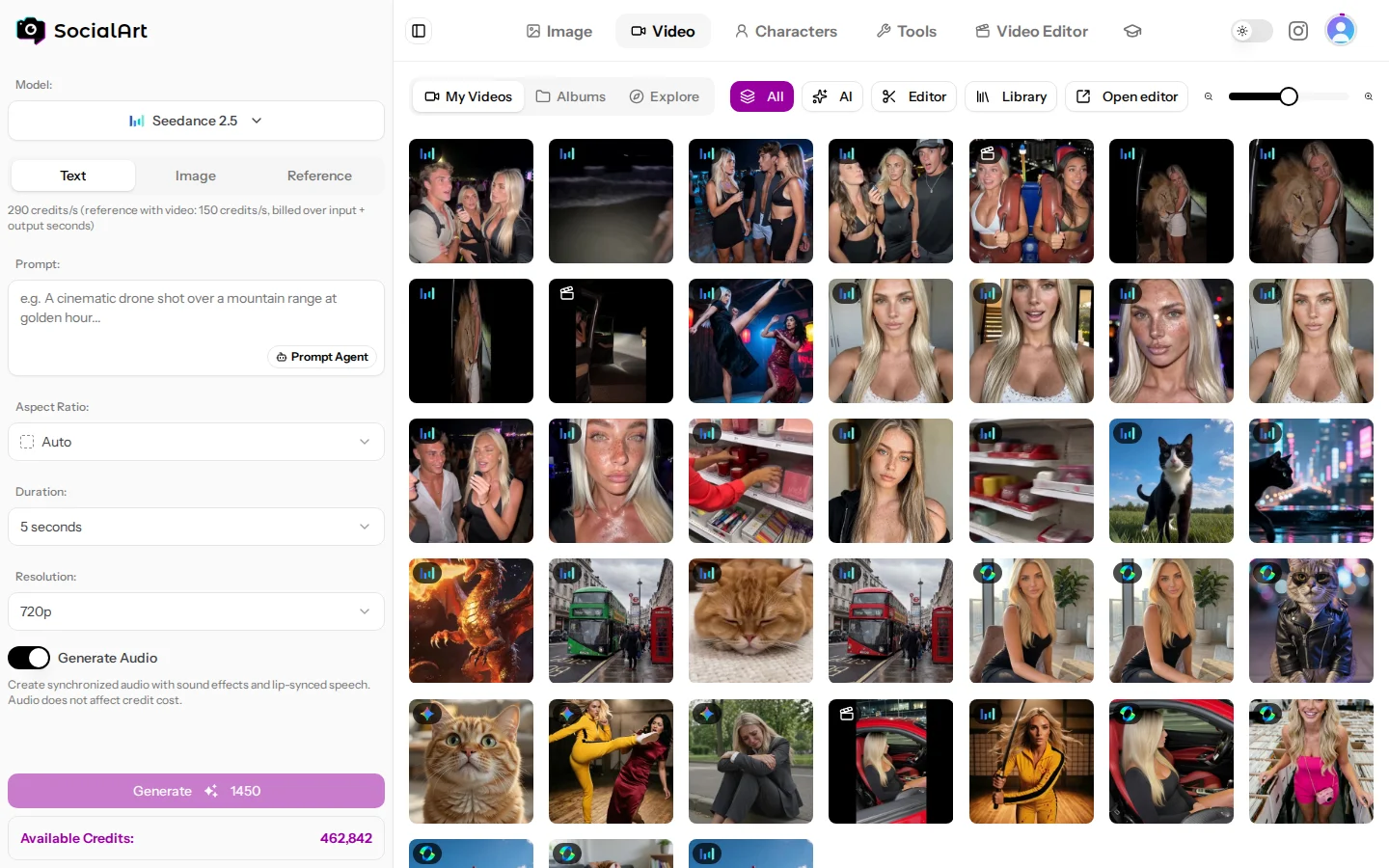
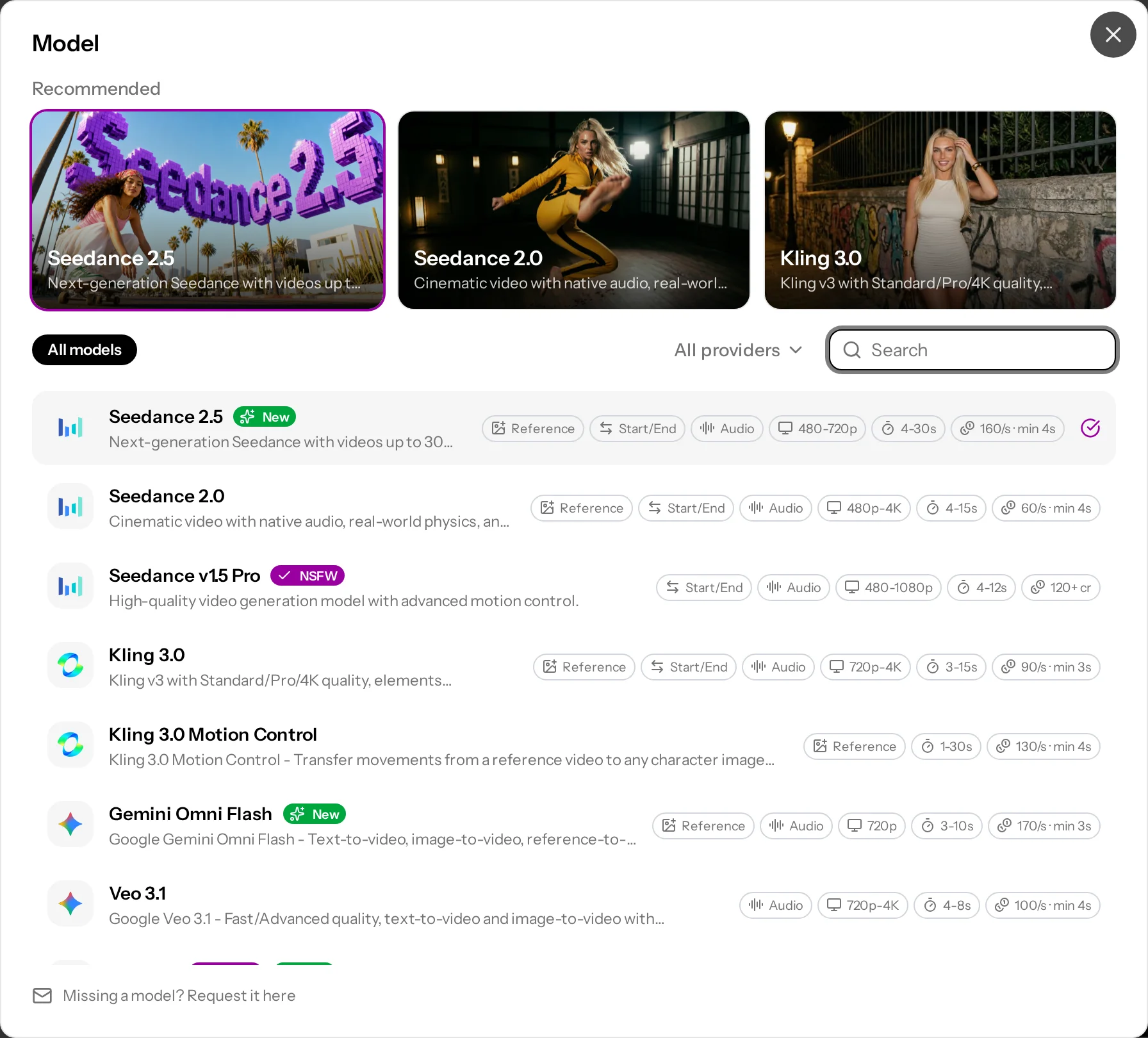
- Choose a model from the picker. Recommended models are marked; models that allow NSFW content carry an NSFW badge.
- Pick a mode: text-to-video, image-to-video, reference-to-video or motion control, depending on the model.
- Write a prompt or let the Prompt Agent write one (Prompt Agent). Prompts can be up to 16,000 characters; some models accept less (Kling and Happy Horse 2,500, Grok Imagine Video 4,096, LTX, Wan, PixVerse and Hailuo 5,000) and the form tells you before you generate.
- Set duration, resolution, aspect ratio, quality tier and audio.
- Check the credit total on the Generate button and generate. While reference files are still uploading, the button waits and shows Uploading N files....
Video generation takes longer than images. A progress tile at the top of your history shows the current step (Queue, Generate, Finish, preceded by Verify when Seedance references are checked first) and the elapsed time, and turns into the video when it is done. If a generation fails, the tile shows Failed with the reason, and the credits are refunded automatically.
Modes
- Text-to-video. Generate from a prompt alone.
- Image-to-video. Start from a first frame (an upload, an image from your history, or a generated image). Many models also accept a last frame so the clip moves from one image to the other.
- Reference-to-video. Give the model several reference images, videos and audio clips and address them in the prompt ("Image 1", "Video 1"). Available on Seedance 2.0 and 2.5, Kling 3.0 (Omni), Wan 3.0, Wan 2.7, Hailuo 3 Max, Happy Horse and Gemini Omni Flash.
- Motion control. Transfer the movement of a video onto a character image (Kling 3.0 and Kling v2.6 Pro Motion Control).
- Edit or extend a video. Seedance 2.5 can extend or edit an existing clip; Grok Imagine Video can edit an uploaded video; Hailuo 3 Recast (Video Recast) replaces the people in an uploaded video with your reference photos.
- Multi-shot. Kling 3.0 (up to 6 shots in one clip), Wan 2.7 and PixVerse v6 can plan several shots in a single generation.
Audio and voices
- Many models generate sound, music and speech natively. On most models the audio toggle changes the per-second price.
- Reference audio. Upload mp3 or wav clips, or a video (MP4 or MOV) to use its sound, to your audio history and use them as references in Seedance 2.0 (up to 15 s combined, together with at least one image or video) and Seedance 2.5 (up to 30 s combined, also on its own).
- Voice cloning. Upload a 5–30 second audio sample (mp3, wav, ogg, m4a or aac, up to 10 MB) to clone a voice (the cost is shown before you start). Use up to 2 cloned voices in a Kling 3.0 or Kling v2.6 Pro generation so the characters speak with that voice. Voices are created and managed from the voice selector in the video form.
History, albums and sharing
A filter above the history shows all videos, only AI generations or only editor renders (once you have editor renders), the videos of one model, or the clips you bought in the marketplace. Switch the history between Square grid and Original aspect ratio, group videos into albums, download originals and delete videos. Your videos are private. Models that take reference videos (Seedance 2.0 and 2.5, Wan 3.0, Wan 2.7, Hailuo 3 Max, Hailuo 3 Recast) let you pick earlier videos from your history.
Video models
Every model with its modes, reference support, durations, resolutions and aspect ratios. Video is priced per second; the studio shows the exact total before you generate. "NSFW" marks models that allow NSFW content for adult creators.
| Model | Vendor | Modes and references | Duration | Resolution | Aspect ratios | Audio and options |
|---|---|---|---|---|---|---|
| Seedance 2.5 | ByteDance | Text; first and last frame; reference-to-video with up to 30 images, 10 videos and 10 audio clips; extend or edit a clip | 4–30 s | 480p, 720p, 1080p | auto, 21:9, 16:9, 4:3, 1:1, 3:4, 9:16 | Audio toggle. With a first frame, or when you edit or extend a clip, the aspect ratio follows the source. Recommended. |
| Seedance 2.0 | ByteDance | Text; first and last frame; reference-to-video with up to 9 images, 3 videos and 3 audio clips | 4–15 s | 480p, 720p, 1080p, 4K (1080p and 4K in normal quality) | auto, 21:9, 16:9, 4:3, 1:1, 3:4, 9:16 | Normal, fast or mini quality; audio toggle; seed. Recommended. |
| Seedance v1.5 Pro | ByteDance | Text; first and last frame | 4–12 s | 480p, 720p, 1080p | 21:9, 16:9, 4:3, 1:1, 3:4, 9:16 | Audio toggle, fixed camera, seed. NSFW. |
| Kling 3.0 | Kling | Text; first and last frame; up to 2 character elements; multi-shot prompts with up to 6 shots; Omni: reference-to-video with up to 7 reference images and elements (at least 1 image), addressed as @Image1, @Element1 | 3–15 s | Standard, Pro or 4K | 16:9, 9:16, 1:1 | Audio toggle, up to 2 cloned voices, negative prompt. Recommended. |
| Kling 3.0 Motion Control | Kling | A character image plus a motion video of up to 30 s (10 s with Image orientation); 1 element with Video orientation | Follows the motion video | Standard or Pro | Follows the character image | Keep the original sound. |
| Gemini Omni Flash | Text; first frame; reference-to-video with up to 9 images | 3–10 s | 720p | 16:9, 9:16 | Audio always on. | |
| Veo 3.1 | Text; first frame | 4, 6 or 8 s | 720p, 1080p, 4K | auto, 16:9, 9:16 | Fast or advanced quality, audio toggle, negative prompt, seed. | |
| Wan 3.0 | Alibaba | Text; first and last frame; reference-to-video with up to 10 images and 5 videos | 2–30 s | 480p, 720p, 1080p | adaptive, 16:9, 4:3, 1:1, 3:4, 9:16 | Prime tier; audio toggle (same price), deep-thinking mode, seed. NSFW. |
| Wan 2.7 | Alibaba | Text; first and last frame; reference-to-video with up to 9 images and 3 videos; multi-shot | 2–15 s (reference-to-video 2–10 s) | 720p, 1080p | 16:9, 9:16, 1:1, 4:3, 3:4 | Prompt expansion, negative prompt, seed. NSFW. |
| Kling v2.6 Pro | Kling | Text; first and last frame | 5 or 10 s | 1080p | 16:9, 9:16, 1:1 | Audio toggle, up to 2 cloned voices, negative prompt. |
| Kling v2.6 Pro Motion Control | Kling | A character image plus a motion video of up to 30 s (10 s with Image orientation) | Follows the motion video | 1080p | Follows the character image | Keep the original sound. |
| Grok Imagine Video | xAI | Text; image; edit an uploaded video | 6–15 s | auto, 480p, 720p | 16:9, 4:3, 3:2, 1:1, 2:3, 3:4, 9:16 | No audio. |
| PixVerse v6 | PixVerse | Text; first frame | 1–15 s | 360p, 540p, 720p, 1080p | 16:9, 4:3, 1:1, 3:4, 9:16, 2:3, 3:2, 21:9 | Styles (anime, 3D animation, clay, comic, cyberpunk), multi-clip, audio toggle, negative prompt, seed. |
| Happy Horse | Alibaba | Text; first frame; reference-to-video with up to 9 character photos | 3–15 s | 720p, 1080p | 16:9, 9:16, 1:1, 4:3, 3:4 | Native audio with multilingual lip-sync, seed. |
| LTX Video 2.3 | Lightricks | Text; first frame and optional last frame | 6, 8 or 10 s | 1080p, 1440p, 4K | 16:9, 9:16 | 24, 25, 48 or 50 fps; audio toggle (same price). |
| Hailuo 3 Max | MiniMax | Text; first and last frame; reference-to-video with up to 12 images and 5 videos, addressed as "Image 1", "Video 1" | 5–15 s | 480P, 768P | 21:9, 16:9, 4:3, 1:1, 3:4, 9:16 | Prompt Optimization (balanced or quality). No audio. |
| Hailuo 3 Recast | MiniMax | Replace the people in a 5–30 s source video (upload or history) with up to 4 reference photos; optional prompt | Same as the source video | 768P, 1080P | Follows the source video | Keeps the source motion, camera, cuts and sound. Also available as a tool page: Video Recast |
Which video model should I use?
- Cinematic with sound: Seedance 2.5, Kling 3.0, Veo 3.1.
- Long clips (up to 30 s): Seedance 2.5, Wan 3.0.
- Cheap tests and stylised looks: PixVerse v6.
- Talking characters with your own voice: Kling 3.0 or Kling v2.6 Pro with a cloned voice.
- Lip-sync in many languages: Happy Horse.
- Reuse a dance or gesture: Kling Motion Control.
- Highest resolution: LTX Video 2.3 (4K), Seedance 2.0 (4K), Kling 3.0 (4K), Veo 3.1 (4K).