
Kling 3.0: AI Video & Image Generation with Multi-Shot Capabilities
Meet Kling 3.0, a multimodal AI model for creating short videos, images, and multi-shot sequences from text prompts, uploaded images, and reference materials.
4K Video Generation
Create videos up to 15 seconds with 4K options, motion controls, and integrated audio generation.
Advanced Image Creation
Generate high-quality images with text-to-image and image-to-image capabilities, including element control and character consistency.
Kling 3.0 combines video and image generation in one model family, with support for 4K video, multi-shot prompting, reference images, and audio options. It gives creators more control over short-form visual generation without requiring a traditional production setup for every concept.
Whether you're a content creator, filmmaker, marketer, or creative professional, Kling 3.0 can help draft visual concepts from text-to-video, image-to-video, text-to-image, and image-to-image workflows.
What Makes Kling 3.0 Useful?
Kling 3.0 brings several practical controls into one workflow, including multi-shot sequencing, image references, audio generation, and resolution options. Output quality still depends on the prompt, input materials, settings, and model availability.
🚀 Core Features:
Video Generation Capabilities
Kling 3.0 offers text-to-video and image-to-video workflows with controls for duration, aspect ratio, audio, and multi-shot structure.
Text-to-Video Generation
Turn written descriptions into short video drafts. Describe the subject, setting, action, camera movement, and style so Kling 3.0 has enough context to generate a usable result.
Key Features:
- • Multiple aspect ratios: 16:9, 9:16, and 1:1
- • Flexible duration: 3-15 seconds
- • Native audio generation with custom voices
- • Multi-shot storytelling with up to 6 scenes
- • Advanced scene transitions and camera work
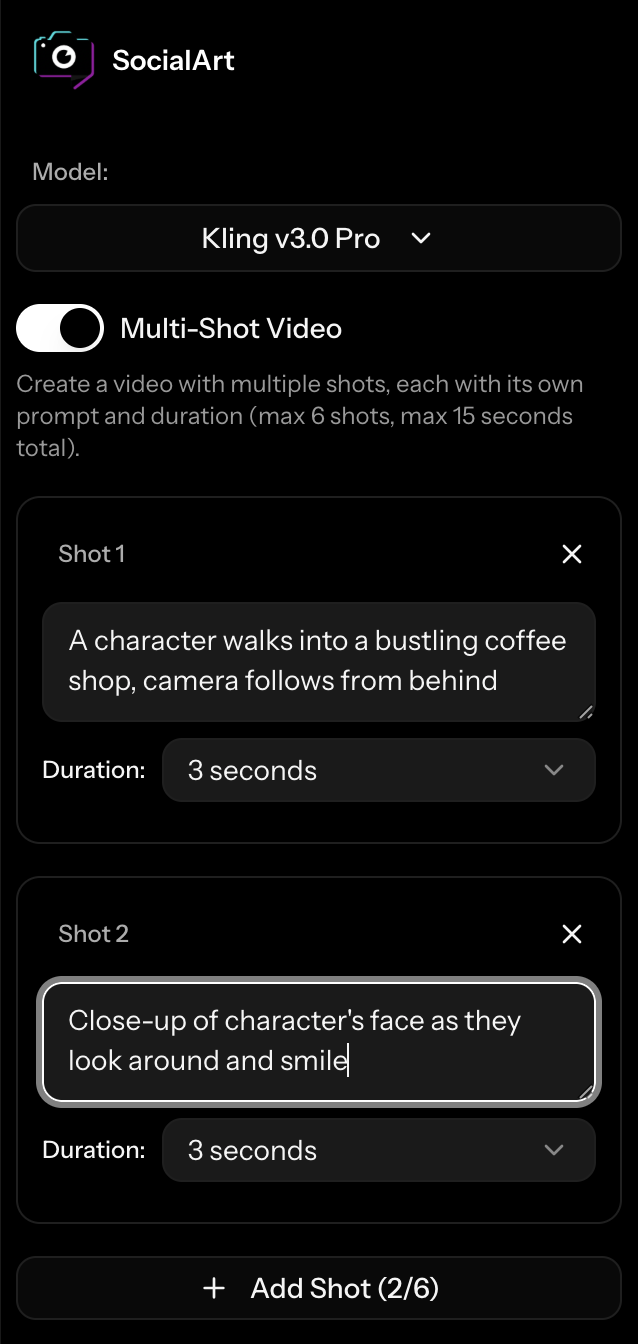
Image-to-Video Animation
Use an uploaded image as the starting point for animation. Clear subjects and well-composed references usually give the model more to work with.
Advanced Features:
- • Start and end frame control
- • Motion direction and intensity
- • Seamless image integration
- • Cinematic camera movements
- • Natural physics simulation
Multi-Shot Video Technology
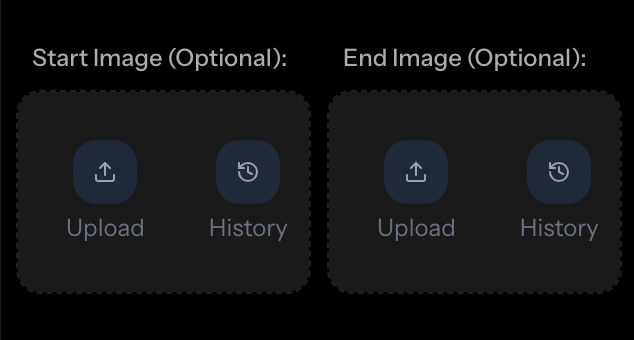
One of Kling 3.0's most useful features is multi-shot video generation. You can define multiple scenes, camera angles, and shot transitions within one generation cycle.
🎬 Multi-Shot Capabilities
How Multi-Shot Works:
Multi-Shot Example Sequence:
Advanced Image Generation with Element Control
Kling 3.0's image generation capabilities offer text-to-image and image-to-image creation with element control and reference image support for more consistent visual direction.
Text-to-Image Creation
Generate stunning images from detailed text descriptions with support for various aspect ratios and resolutions.
- • Multiple resolutions: 1K and 2K
- • Various aspect ratios supported
- • Advanced prompt understanding
- • Element consistency control
Image-to-Image Enhancement
Transform existing images with intelligent modifications while preserving important details and character identity.
- • Style transfer and enhancement
- • Character identity preservation
- • Advanced element control
- • Reference image support
🎯 Advanced Element Control
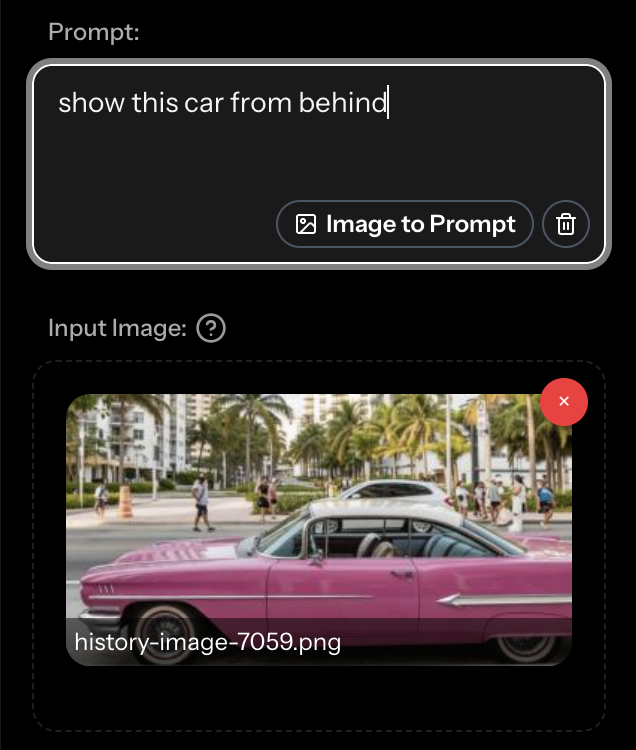
Kling 3.0's element control system helps guide character and object consistency across generations. Upload frontal images and reference photos to give the model clearer identity references.
Professional Applications & Use Cases
Kling 3.0 can support a range of professional workflows, from content ideation to marketing concepts and entertainment pre-visualization.
Content Creation
Draft video concepts for social media, YouTube, and marketing campaigns with multi-shot storytelling and polished visual direction.
Marketing & Advertising
Produce ad concepts, product demonstrations, and brand content with reference-based character representation.
Film & Entertainment
Create short film drafts, concept visualizations, and entertainment content with cinematic prompts and structured shots.
Education & Training
Develop educational content, training materials, and instructional videos with clear visual narratives and engaging presentations.
Product Visualization
Showcase products in dynamic environments, create virtual demonstrations, and produce compelling product stories with realistic animation.
Art & Design
Explore creative concepts, generate artistic variations, and test visual directions with AI-powered creation tools.
Technical Specifications & Performance
| Feature | Video Generation | Image Generation |
|---|---|---|
| Maximum Resolution | Native 4K (2160p) | 2K (2048px) |
| Duration/Output | 3-15 seconds | Single high-quality image |
| Aspect Ratios | 16:9, 9:16, 1:1 | 16:9, 9:16, 1:1, 4:3, 3:4, 3:2, 2:3, 21:9 |
| Audio Support | Native integrated audio | N/A |
| Multi-Scene Support | Up to 6 shots per video | Element consistency across generations |
| Generation Time | 2-5 minutes | 30-90 seconds |
| Character Consistency | Cross-shot character identity | Reference image support |
Getting Started with Kling 3.0
Getting started with Kling 3.0 is straightforward: choose a mode, add clear inputs, review the output, and iterate where needed.
Choose Your Creation Type
Select from text-to-video, image-to-video, text-to-image, or image-to-image generation based on your creative needs and starting materials.
Configure Your Settings
Set your preferred resolution, aspect ratio, duration, and enable advanced features like multi-shot generation or audio integration as needed.
Provide Your Creative Input
Write detailed descriptions, upload reference images, or define multi-shot sequences. The more specific your input, the better your results.
Generate and Refine
Let Kling 3.0 generate an output, then review the result and adjust your prompt, references, or settings as needed.
Try Kling 3.0 in SocialArt.ai
Use Kling 3.0 for short video drafts, image generation, and multi-shot experiments directly from the SocialArt.ai studio.
Frequently Asked Questions
What makes Kling 3.0 different from other AI video generators?
Kling 3.0 combines multi-shot video generation, 4K output options, integrated audio generation, and reference-based character consistency. The multi-shot feature lets you structure up to 6 distinct scenes in a single generation.
How long does it take to generate a video?
Generation times vary based on complexity, duration, quality tier, and current system load. Simple videos may complete in a few minutes, while complex multi-shot videos can take longer.
Can I use custom voices for audio generation?
Yes! Kling 3.0 supports up to 2 custom voices per video generation. You can upload your own voice samples and reference them in your prompts using special tags like <<<voice_1>>> and <<<voice_2>>>.
How does element consistency work for character control?
Upload a frontal image and up to 3 reference photos of your character. Kling 3.0 uses those references to guide character appearance across different shots, angles, and lighting conditions.
What's the maximum video length I can create?
Individual videos can be up to 15 seconds long. With multi-shot generation, you can distribute this time across up to 6 different scenes, allowing for complex storytelling within the duration limit.
Is Kling 3.0 suitable for commercial use?
Kling 3.0 can be used in professional workflows, but usage rights and platform rules still depend on your plan, input materials, generated output, and where you publish the result.
Share this article