
Prompt Agent: Your AI Assistant for Perfect Image & Video Prompts
A great prompt is the difference between a mediocre result and a scroll-stopping one — but writing one is a skill in itself. The Prompt Agent writes it for you. Describe your idea in plain words and it crafts a polished, model-ready prompt in seconds.
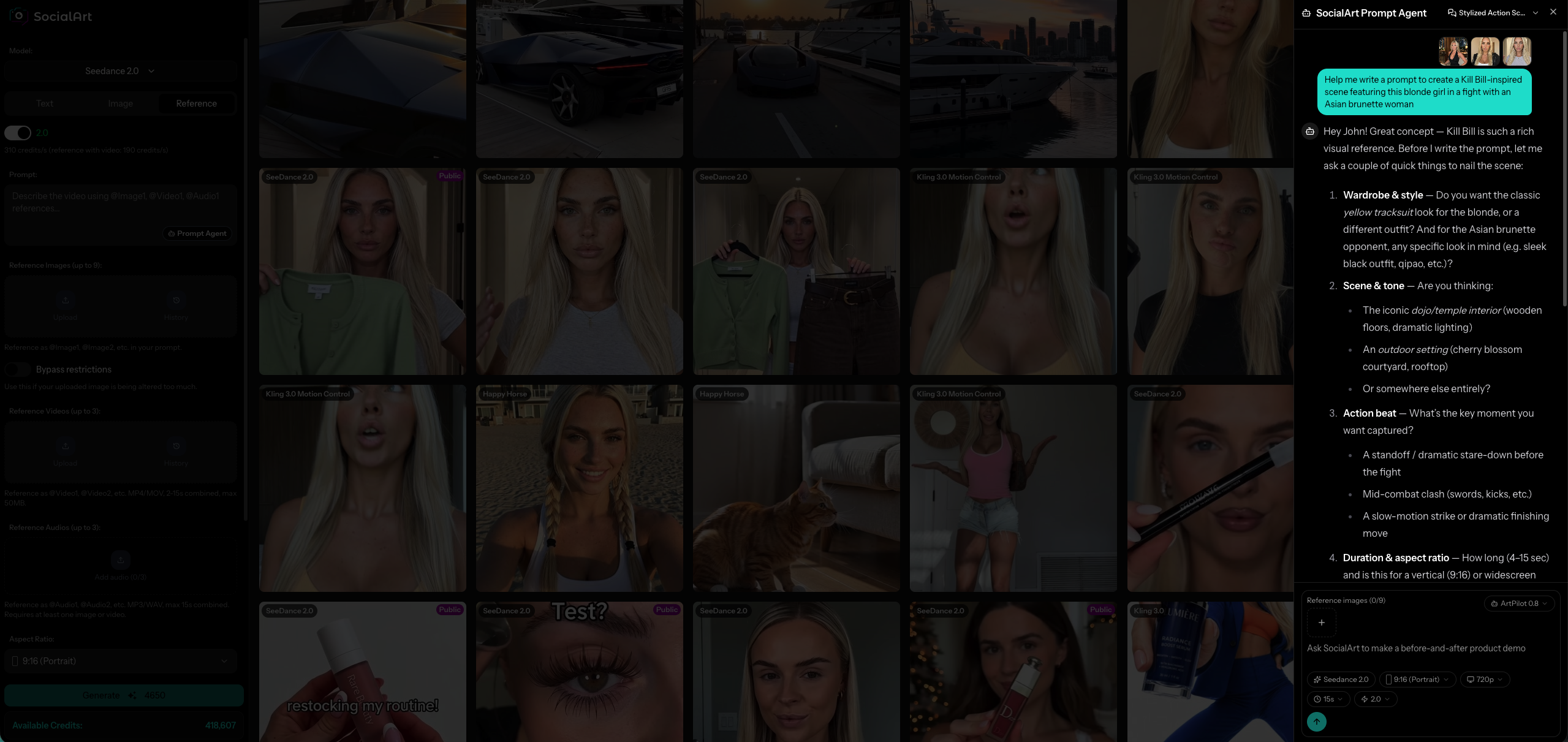
The Prompt Agent lives right next to your prompt field in the image and video studio.
Every modern AI image and video model has its own “language.” What produces a cinematic masterpiece in one model falls flat in another. Getting great results means learning camera terms, lighting language, composition cues and each model's quirks — that's real prompt engineering, and most people don't have time for it.
The Prompt Agent closes that gap. It's a built-in AI assistant that turns a rough idea into a professional prompt, tuned to the exact model you've selected. You stay creative; it handles the craft.
How the Prompt Agent Works
Open it from your prompt field
In the image or video studio, tap the Prompt Agent button next to the prompt box. A chat panel slides in, already aware of the model you've picked.
Describe your idea in plain words
Say something like “a cinematic portrait of a woman in a neon-lit Tokyo street at night.” Attach reference images or a saved character if you have them. The agent asks a quick clarifying question when it will make the result noticeably better.
Get a ready-to-use prompt
The agent returns a polished prompt in a tidy card. Hit Use prompt and it drops straight into your prompt field — ready to generate.
See It in Action
Here's a real example. From a one-line request, the Prompt Agent researches the references with web search, reasons the shot through, and hands back a polished, multi-shot prompt — ready to drop in with a single tap.
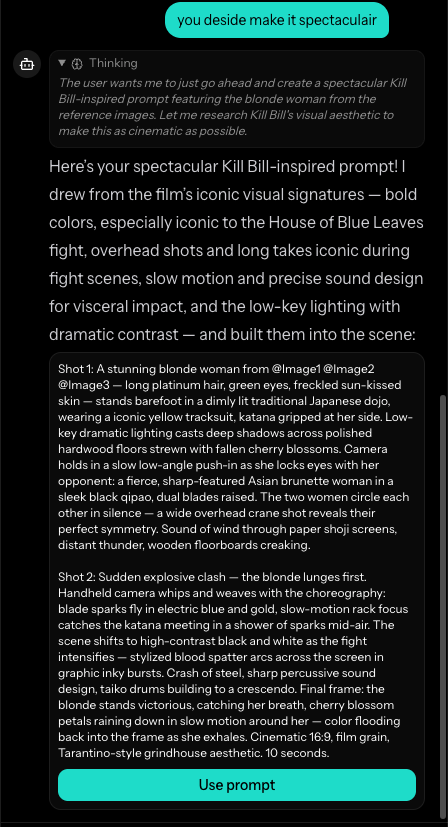
The agent researches, reasons, then returns a ready-to-use prompt — tap Use prompt to apply it.
What Makes the Prompt Agent Different
1 It knows every model's playbook
The agent carries a dedicated prompting guide for each model, based on the official documentation. It knows that Nano Banana loves natural language, that Seedream rewards precise composition, and that video models like Kling and Veo need clear motion and shot direction. Switch models and its advice changes with you.
2 It sees your references and characters
Attach reference photos or one of your saved characters and the agent actually looks at them, reflecting the subject, outfit, palette and composition in the prompt. Point it at a specific image with an @mention — like @Image2 or @Start frame — and it focuses on exactly that.
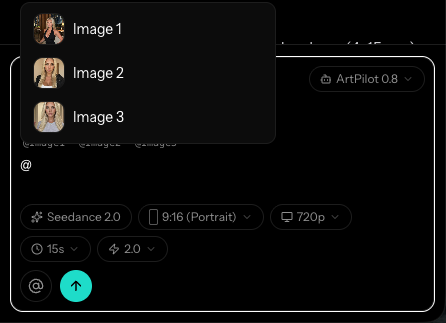
3 It asks the right questions
When your brief leaves real creative choices open — mood, wardrobe, time of day, lighting, camera and lens — the agent asks one or two sharp questions before it commits. The result is a prompt that matches what you actually pictured, not a generic guess.
4 Image and video, one assistant
Whether you're making a still image or a short video, the Prompt Agent adapts. For video it thinks in shots, motion and pacing; for images it thinks in composition, light and style — always tuned to the model you've chosen.
5 It researches the real world with web search
When a scene benefits from real facts — a film's exact visual signature, a famous location's vibe, a current trend or a real product — the Prompt Agent runs a web search and folds those authentic details into your prompt. Ask for a “Kill Bill-inspired” shot and it actually looks up the film's aesthetic before writing, so the result feels grounded and specific instead of generic.
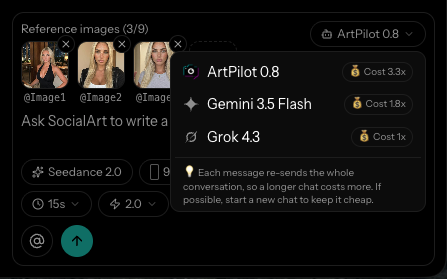
6 Choose your engine — and see the cost
Pick the engine that fits the moment, from our flagship ArtPilot to faster, lighter options. The relative cost of each engine is shown right in the picker, so you're always in control of your credits.
Who It's For
Beginners
Never written an AI prompt before? Just describe what you want in everyday language and get a pro-level prompt back.
Content creators
Move faster from idea to post. Iterate on wording in seconds instead of guessing at what each model wants.
Marketers & brands
Turn a campaign brief into consistent, on-message prompts for product shots, ads and social content.
Power users
Already fluent in prompting? Use the agent to draft a strong base you can refine, and to adapt a prompt when you switch models.
Video makers
Get shot-by-shot direction with clear motion and pacing for models like Kling, Veo, Seedance and more.
Teams
Standardize quality across everyone who touches generation — no prompt-writing experience required.
Frequently Asked Questions
What is the Prompt Agent?
It's SocialArt's built-in AI assistant that helps you write the best possible prompt for your selected image or video model. You describe your idea in plain language and it turns it into a polished, ready-to-use prompt.
Do I need to know prompt engineering to use it?
No. The Prompt Agent handles the prompt engineering for you. It knows the best practices for each model and asks a couple of clarifying questions when helpful, so you get professional results without learning prompt syntax.
Does it work for both image and video?
Yes. The Prompt Agent works across both the image and video studio and tailors its guidance to whichever model you have selected — from Nano Banana and Seedream to Kling, Veo and more.
Can the Prompt Agent search the web?
Yes. When it helps the prompt — researching a film's look, a real location, a current trend or a specific product — the Prompt Agent runs a web search and folds those real-world details into your prompt so the result feels authentic instead of generic.
Can it use my reference images and characters?
Yes. The agent can see the reference images and saved characters you attach, and you can point it at a specific one with an @mention so it weaves that exact subject, outfit or style into the prompt.
How much does the Prompt Agent cost?
It runs on credits, and a single turn costs only a few credits. You can also pick a lighter, cheaper engine when you want to keep costs to a minimum — the relative cost of each engine is shown right in the picker.
Write your best prompt yet
Open the Prompt Agent in the studio, describe your idea, and let it craft a model-ready prompt in seconds. No prompt-engineering skills required.
Share this article
Related Articles
Nano Banana 2: Google's Lightning-Fast AI Image Generator
4x faster generation, web search integration, and excellent text rendering at lower cost.
Influencer Remix: AI-Powered Influencer Content — No Prompt Needed
Upload your character and let AI create stunning influencer-style scenes automatically.